Artspire: AI Video Generator
- 3.2
- Rating
- 1.00M
- Installs
- Free
- Price

 Analysis by App-foxy
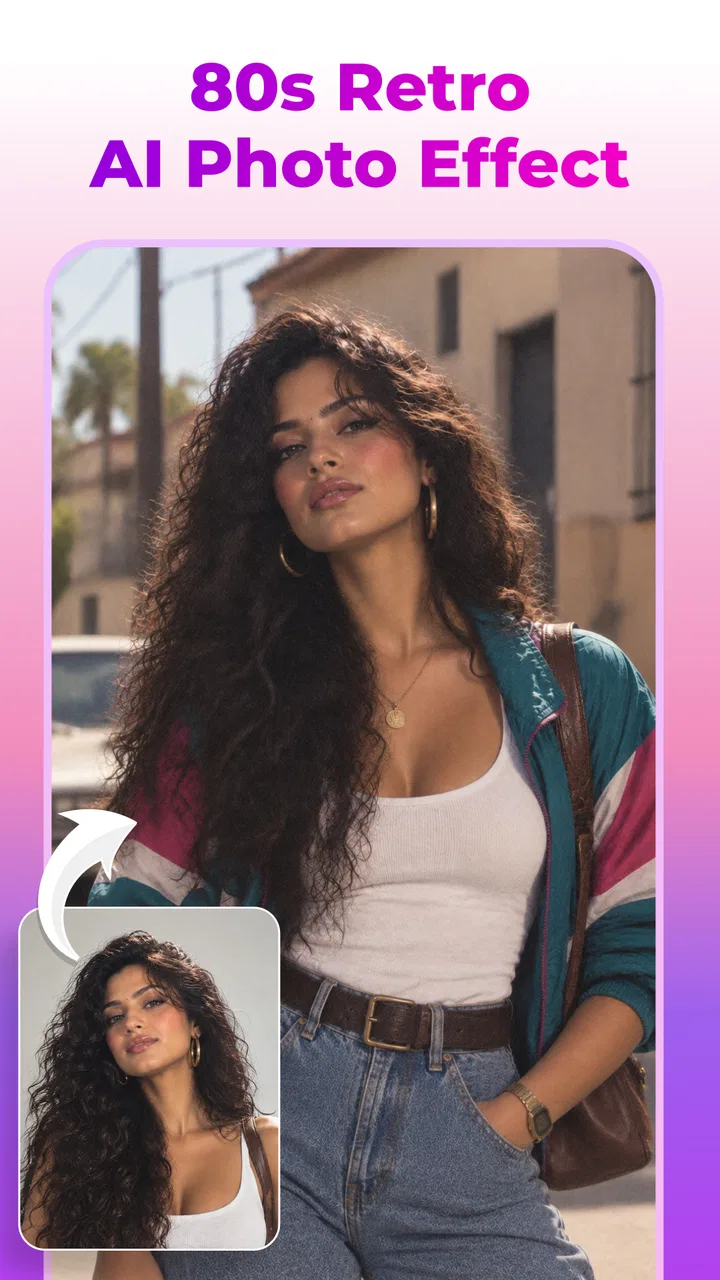
I approached Artspire: AI Video Generator as a quick creative tool rather than a replacement for a full video editor, and that distinction shaped my experience. Its appeal is immediate: start with a photo, apply an AI art treatment, and move toward a more animated result without needing to understand complicated editing software. For casual creators, that can make visual experimentation feel much less intimidating.
At the same time, this is not the kind of app I would recommend blindly to everyone who makes videos. The quality of an AI-generated result depends heavily on the source image, the prompt or creative direction you give it, and how much refinement you are willing to do afterward. My overall view is that Artspire is most useful when you want a fast visual idea, a social post, or an imaginative variation of an existing picture. It is less convincing when you need precise control, consistent characters, or a polished production workflow.
How Artspire feels in everyday creative work
Artspire belongs to the art and design side of mobile apps, but its purpose is more visual storytelling than traditional drawing. The central workflow revolves around transforming still images into AI-assisted artwork and dynamic video concepts. That makes it a natural fit for people who have photos they want to reinterpret rather than blank canvases they want to build from scratch.
You May Also Like

 Blood Strike: 2.5 Anniversary
Blood Strike’s Loadouts Turn Every Drop Into a Tactical Gamble
A close look at Blood Strike’s custom loadouts: how fast access to signature weapons reshapes its battle royale rhythm, rewards preparation, and narrows the gap between fights.

 Pandora - Music & Podcasts
Pandora’s Music Is Easy to Start, but Harder to Recover
Pandora’s strength is its low-effort path from a seed to a station. Its weak spot is how much confidence it asks you to place in connection, setup, and quiet recovery.

 8 Ball Pool
 Is Built on Rivalries, Rematches, and Routine
A close look at the rivalries, rematches, shared routines, and unanswered safety questions that turn a quick pool match into a persistent mobile community.

 Samsung Music
’s Quiet Strength Is Playing What You Already Own
Its reach comes less from spectacle than from dependable access to a personal library. That simplicity is both the app’s strongest retention engine and its ceiling.

 AccuWeather: Weather Radar
AccuWeather Review: A Quick, Clear Forecast for Everyday Decisions
For everyday plans, the best forecast is the one you can understand quickly. AccuWeather makes rain timing, radar, and local conditions easy to act on, with a few trade-offs.

 Hill Climb Racing
Why Hill Climb Racing Still Turns Crashes Into One More Run
A tiny car, a bumpy hill and one more upgrade: Hill Climb Racing keeps resurfacing because its simple chaos makes every near-miss feel personal.
More From Our News Desk



In my experience, the most comfortable way to use it is to begin with a clear, well-composed image. A portrait with a visible face, a product photographed against a simple background, or a landscape with a strong subject gives the generator more to work with than a dark, crowded snapshot. This is an important practical point: the app may feel unpredictable when the input is weak, but that does not always mean the creative idea is bad. Often, the source image is simply asking the system to guess too much.
A realistic everyday scenario would be preparing a short birthday message. I could take a favorite family photo, turn it into a stylized visual, and use the resulting motion as the background for a personal greeting. I would not expect the app to create an entire finished presentation by itself, but it can provide the attention-grabbing visual layer that would otherwise require separate design work.
The same approach works for a small shop owner who wants to make a product image feel more lively, or for a traveler who wants to turn a still vacation photograph into a short mood piece. Artspire is especially appealing in these situations because the starting point is familiar: one image, one idea, and a willingness to try a few variations.
The developer behind the app is NXL AI Solutions, and the current version is 3.5.0. It is free to install, which lowers the barrier to testing the basic creative experience. The app is rated for Everyone and runs on devices using Android 8.0 or later, so the compatibility range is broad enough for many Android users, including people who are not carrying a recent flagship phone.
The strongest part is the distance between idea and result
The biggest strength is speed of experimentation. In a conventional art app, turning a photo into something visually distinctive can involve layers, brushes, masks, keyframes, and export settings. Artspire compresses that first stage into a more approachable process. I can begin with an existing image and concentrate on the mood I want instead of learning a complete editing system.
This is valuable for people who are visually curious but not technically trained. Someone may have a good sense of color or atmosphere without knowing how to animate a still image manually. An AI video generator can act as a bridge between those two abilities. It does not remove the need for taste, but it makes the first attempt much easier.
I also like the way this kind of workflow encourages comparison. Rather than committing to one complicated edit, I can think in alternatives: a softer illustration, a more dramatic transformation, or a livelier motion treatment. That makes the app useful during the idea stage, when the main question is not “How do I finish this?” but “Which direction has potential?”
There is a subtle advantage here for social content. A still image may be attractive but easy to scroll past. Motion and visual transformation can give it a stronger opening moment. Artspire is therefore better understood as a tool for creating a visual hook. I would use it to make the first few seconds more interesting, then decide whether the result needs additional editing elsewhere.
Another practical strength is that the app can serve both personal and exploratory purposes. You do not need a formal project every time you open it. Trying an unusual treatment on an old photo can be enjoyable on its own, and that low-pressure experimentation is where AI art tools often feel most rewarding.
Smart ways to get more dependable results
The first tip I would give a new user is to prepare the image before asking for a transformation. Crop away distracting edges, choose a subject with a clear silhouette, and avoid combining several unrelated focal points in one frame. This does not guarantee a perfect result, but it gives the generator a cleaner visual instruction.
The second is to treat the first output as a draft rather than a verdict. AI-generated visuals can have an appealing overall mood while still producing awkward details. A hand, face, object edge, or background transition may not look convincing. Instead of judging the entire app from one imperfect attempt, I would compare several treatments and keep the version whose flaws are least noticeable at the intended viewing size.
The third is to design for the final destination. If the video will be viewed on a phone, a strong central subject usually matters more than tiny decorative details. If the image is destined for a profile post or story, composition becomes just as important as the effect itself. A visually impressive transformation can lose its impact if the main subject is cropped or obscured after publishing.
A less obvious workflow is to use Artspire before opening a traditional editor. I would generate a few visual directions first, select the strongest one, and then use a separate editor for exact trimming, captions, audio, or brand placement. This saves time because I am not polishing an idea before knowing whether the underlying look works.
Another useful approach is to keep the original photo separate from the generated version. AI transformations are experimental, and the first result may not be the best one. Keeping the source untouched lets me return to the same concept later with a different crop or a different creative direction instead of losing the starting point.
Where the experience becomes less convincing
The main weakness is control. Artspire can help produce a striking interpretation, but I would not choose it when every visual detail must remain consistent from one frame to the next. AI-generated motion and art treatments can be expressive without being fully predictable, which is fine for a playful post but frustrating for a precise campaign or a carefully designed sequence.
This limitation becomes more noticeable when the source image contains several important objects. The app may understand the broad subject while changing smaller relationships that matter to the creator. For example, a product’s shape, a person’s expression, or the arrangement of objects may shift in a way that makes the result less suitable for professional presentation.
The app also requires patience with selection. The fastest workflow is not always the one that produces the best result. I would expect to spend time choosing an input, trying a creative direction, checking the output, and deciding whether the result is worth keeping. Anyone expecting a single tap to produce a finished cinematic clip may find the experience underwhelming.
There is also a cost consideration. Although the app is free, in-app purchases range from $4.99 to $79.99 per item. That does not automatically make it poor value, but it does mean I would explore the free experience carefully before paying. The important question is not simply whether premium access exists; it is whether the particular output quality and workflow fit the kind of projects I actually make.
The public response is mixed rather than universally enthusiastic, with an average rating of 3.2 from around 1.8 thousand ratings. I read that as a reason to keep expectations realistic. The app has attracted over a million installs, so it clearly has broad interest, but popularity does not remove the need to test it on your own images and device.
One further trade-off is the difference between visual novelty and repeatability. Artspire can make a familiar image feel new, but novelty alone is not a complete editing strategy. If I wanted a consistent visual identity across a series of posts, I would need to inspect every result carefully and probably finish the work in another tool. For one-off creative pieces, that is manageable. For a large batch of matching assets, it could become tiring.
Who should use it, and who should look elsewhere
I would recommend Artspire to casual creators, social media users, students exploring visual ideas, and anyone who wants to animate or reinterpret personal photos without learning a complex desktop program. It is also a sensible option for brainstorming. A designer could use it to explore a mood before rebuilding the chosen direction with more exact tools.
It may be particularly enjoyable for people who like experimenting with portraits, travel images, celebrations, and imaginative artwork. The app gives those subjects a way to move beyond ordinary photo filters. Instead of making a minor color adjustment, I can ask for a more substantial change in style and atmosphere.
Small businesses may also find a limited but useful role for it. A shop owner could create a visual teaser for a new item, a seasonal post, or a behind-the-scenes idea. I would still inspect the result closely before using it commercially, especially if the exact appearance of the product matters. AI creativity is helpful for attention, but accuracy should remain the priority when customers need to recognize a real item.
I would advise professional editors, filmmakers, and brand teams to treat it as a supplementary idea generator rather than their main production system. If you need exact timing, repeatable animation, detailed typography, reliable object preservation, or a complete timeline-based workflow, a conventional video editor will be the better choice.
The same applies to users who dislike trial and error. Artspire is not the right fit if you want complete manual control from the beginning. A layer-based art app or a traditional animation editor may feel slower, but those tools let you decide precisely where each element belongs. The trade-off is effort versus flexibility, and Artspire clearly favors speed and experimentation.
Questions I would consider before installing
If you are wondering whether the free version is enough, my advice is to install it with one or two realistic images rather than judging it from an idealized example. Test the kind of content you actually want to make. A portrait creator, a shop owner, and a travel blogger may have very different experiences because their source material places different demands on the generator.
If you are concerned about device compatibility, Android 8.0 is the minimum operating system, so older supported devices may still be eligible. Even so, AI-focused creative work can feel more comfortable on a phone with a capable processor, sufficient free storage, and a stable connection. I would avoid starting a serious project when the device is already struggling with ordinary media tasks.
If you want to know whether it replaces a video editor, I would say no. It can help create the visual material, but exact sequencing and finishing are better handled elsewhere. Think of it as the imaginative first step or the source of a short visual element, not as a complete substitute for every editing tool.
If you are deciding whether purchases are worthwhile, first identify what you need from the app. Someone who only wants occasional personal experiments may be satisfied without spending. A frequent creator may find value in additional access, but should still compare the results with the cost and with alternative art or video apps that offer more manual control.
Finally, if privacy or ownership is a major concern for your project, I would read the app’s current store and in-app information carefully before uploading sensitive images. That is especially important for family photos, client material, and unreleased products. Creative convenience should not replace sensible judgment about which images belong in an AI workflow.
My final view after using it as a creative companion
Artspire succeeds when I ask it to do something focused: take a meaningful image and push it toward a more expressive, animated, or artistic presentation. Its best quality is not professional precision but accessibility. It lowers the effort needed to explore a visual idea, and that can be genuinely useful when inspiration is present but technical skill or time is limited.
Its weaknesses are just as important. Results can require selection and cleanup, control is not as exact as in a conventional editor, and the purchase range means I would not commit financially before testing the workflow. The mixed average rating reinforces my view that this is an app to evaluate with your own images, not one to accept on promise alone.
My recommendation is straightforward: try it if you want fast AI-assisted photo art and short dynamic visuals, especially for personal projects and social content. Keep a traditional editor nearby for precision, consistency, and final assembly. If you approach Artspire as a source of creative possibilities rather than a one-tap production studio, its strengths become much easier to appreciate.
For me, that makes it a worthwhile free experiment for the right audience, but not an all-purpose answer to mobile video creation. NXL AI Solutions has built something approachable for visual play, and version 3.5.0 is most compelling when the goal is to discover an interesting direction quickly. Users who value control above surprise should choose a different kind of tool.
FAQs for Artspire: AI Video Generator
01What is Artspire: AI Video Generator, and what can it do?
Artspire: AI Video Generator is an AI-powered creative app designed to turn written prompts, images, or creative ideas into short videos. It can help users produce social media clips, animated visuals, promotional content, and artistic experiments without traditional video-editing skills. Results depend heavily on the clarity of the prompt, the source material, and the selected generation style.
02Is Artspire: AI Video Generator free to use?
Artspire may be available to download for free, but access to advanced generation tools, higher-quality exports, additional styles, faster processing, or watermark-free videos can depend on in-app purchases or a subscription. Before creating multiple videos, users should review the current pricing, trial conditions, renewal terms, and any credit limits shown in the app store or inside the application.
03Does Artspire require an internet connection to generate videos?
Yes, users should expect to need a stable internet connection for most or all AI video-generation features. The processing is generally performed on remote servers rather than entirely on the phone, so generation speed can vary according to connection quality, server demand, and video complexity. Offline access may be limited to viewing or managing previously saved content.
04Can videos created with Artspire be used commercially?
Commercial use depends on Artspire’s current license, subscription level, and the rights associated with any images, music, characters, or prompts used in a project. Users creating advertisements, client work, or monetized social content should read the app’s terms and output-license rules carefully. AI-generated material may also require separate permission for third-party assets or recognizable people.
05Is Artspire suitable for beginners, and what should new users know?
Artspire is aimed at users who want a simpler alternative to conventional video-editing software, making it approachable for beginners and casual creators. However, the first results may not always match the prompt perfectly, and some experimentation is usually necessary. New users should begin with short, specific descriptions, check generated videos before sharing them, and save important projects outside the app.
Pros
- Creates polished AI videos from simple text prompts.
- Offers creative styles for social media and short-form content.
- Saves time compared with manual video editing.
- Useful for brainstorming visual concepts and story ideas.
- Beginner-friendly interface with minimal editing experience required.
Cons
- AI results can vary noticeably between different prompts.
- Some features or exports may require a paid subscription.
- Generated videos may include visual glitches or unnatural motion.
- Customization options can feel limited for advanced creators.
- Processing times may increase for longer or more detailed videos.

Artspire: AI Video Generator
Gallery